 DiscountIQ
Before activating an automatic discount, write down the qualifying buyer and cart, review dates and combinations, and test both qualifying and nonqualifying purchases. Check the saved campaign status and actual checkout result. A setup preview or successful save is not enough to prove a promotion works as intended.
Write a one-sentence offer brief
Describe who receives what, on which items, under which conditions, and for how long. For example: qualifying buyers receive a defined reduction on an eligible product group during a specified campaign window. Keep the brief independent of the settings screen so you can use it to review the finished configuration.
If the offer cannot be explained clearly, pause to resolve the rule before launching. Ambiguous exclusions or thresholds tend to become checkout questions later.
- Define the buyer and product eligibility.
- Record the quantity or subtotal threshold, if any.
- State the intended start and end window.
- Decide whether the offer should combine with other promotions.
Match the configuration to the brief
Choose the supported campaign type and enter the rules. Review selected products or eligibility conditions rather than assuming a familiar template has the right scope. Check the saved values after editing dates or thresholds.
In DiscountIQ, guided setup and previews help organize that review. The app supports campaign management, but Shopify's discount rules and the selected configuration still determine what checkout can apply.
| Rule | Review question |
|---|---|
| Quantity threshold | Does the qualifying quantity mean the selected item or the intended product group? |
| Buyer eligibility | Does the selected rule include only the intended buyers? |
| Dates | Are the start, end, and displayed time context correct? |
| Combination settings | Which other active offers are allowed to apply? |
| Status | Is the campaign still being prepared or intentionally active? |
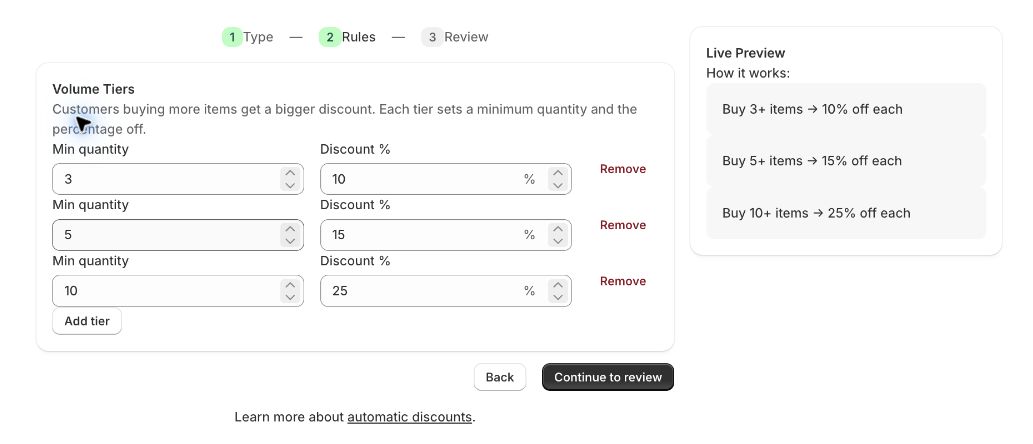
Example: test the 3, 5, and 10 unit tier boundaries
The captured editor has volume tiers of 3 units at 10%, 5 at 15%, and 10 at 25%. The current volume Function evaluates each product-variant cart line. Use one variant for the first four tests, then change the cart structure.
These are configuration-based expectations, not observed checkout results. Record the applied offer, actual discount, merchandise amount, and any other promotion for every cart.
| Cart | Expected tier if this offer applies | Reason for the case |
|---|---|---|
| 2 units of one variant | No volume tier | Just below the first threshold |
| 3 units of one variant | 10% | At the first threshold |
| 4 / 5 units of one variant | 10% / 15% | Below and at the second threshold |
| 9 / 10 units of one variant | 15% / 25% | Below and at the final threshold |
| 2 units of variant A + 1 of B | Neither line reaches 3 | Total cart quantity is not the line quantity |
Test the boundary cases
Build a short test list before trying checkout. Boundary cases are especially useful: one item below a tier, a cart just under a threshold, or a buyer who lacks the selected eligibility. Each should have an expected result written in advance.
Verify shipping and taxes in the actual checkout context rather than treating a merchandise preview as the final order total. Test with relevant existing offers, including codes customers may already have.
- In a development or appropriate test store, create the exact cart from each matrix row.
- Record the cart lines, quantities, buyer context, active codes, and campaign dates.
- Inspect the applied discount labels and compare the merchandise amount before shipping and tax.
- Repeat with relevant codes and an ineligible buyer or excluded condition when your campaign uses one.
- Keep observed results next to expectations and resolve mismatches before activating a customer-facing campaign.
Activate deliberately and record the outcome
Choose publication only after the rules and tests match the intended offer. Confirm the saved status and dates. Check the storefront's campaign messaging so it describes the same eligibility and exclusions as checkout.
Keep a record of the configuration and tests. If a problem appears, use the appropriate deactivation action and investigate the specific mismatch. Do not assume that changing a preview or closing a page has stopped a live promotion.
In DiscountIQ, Continue to review opens the final review; Create Discount is the creation action. Review dates and combination settings there. Closing the editor or changing a preview does not deactivate a saved offer. To stop an existing offer, open it under Shopify Discounts, choose Deactivate, and confirm the resulting status.
Review the campaign after it ends
Confirm that the offer is inactive when intended and remove outdated campaign messaging. Revisit any related codes or combination settings that were changed for the promotion.
DiscountIQ does not promise higher conversion or profit. Evaluate the promotion using the business's own sales, margin, and customer context rather than treating the presence of a discount as evidence of success.
How this guide was checked
Instructions and examples reviewed by SHWRK.
- DiscountIQ volume-tier behavior was checked against its current Function implementation and local Function tests. Shopify management instructions were checked against the linked platform documentation.
- The October 15 capture shows real draft rule values. The boundary matrix states expected behavior to verify; it does not report live checkout tests or a newly launched promotion.
Sources and further reading
Shopify behavior can change. Consult the current documentation and your store settings before making changes.
See where DiscountIQ fits
Plan Shopify discount campaigns and coupon codes with DiscountIQ. Review rules, eligibility, and combinations, then verify the result in checkout.